How We Certify Your Writing Process: Fingerprint, Chain and a Bitcoin Anchor
November 22, 2026 · Equipo Style Optimizer
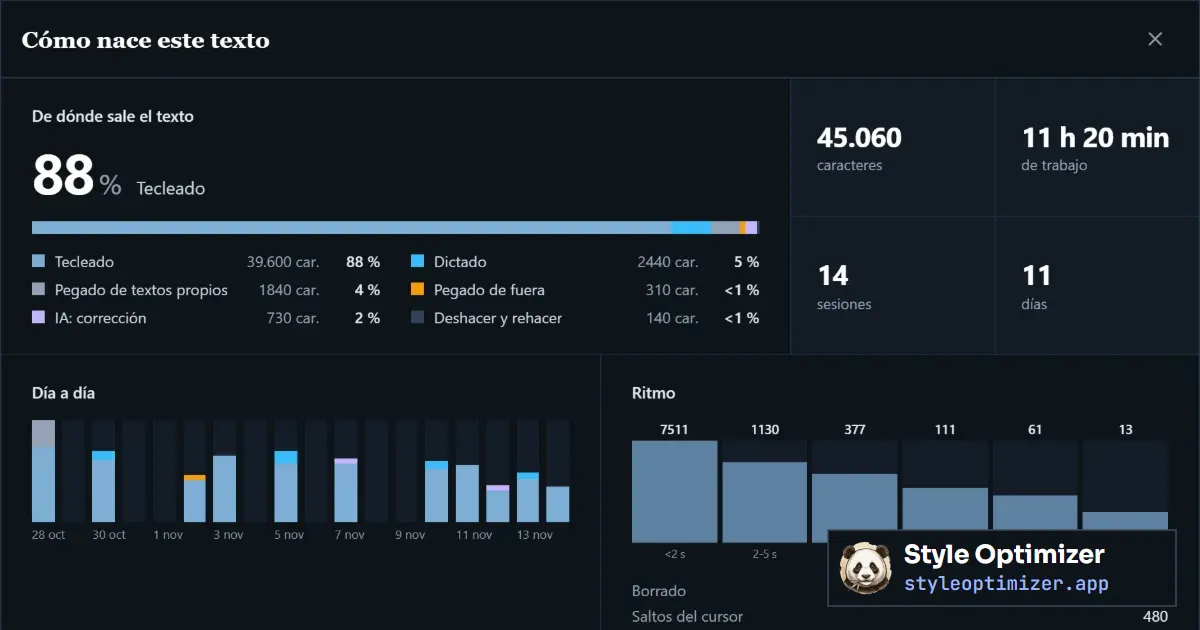
The Style Optimizer certificate tells how a text came to be in the editor: where each character came from, over how many sessions, at what pace and on which days. This post explains the pieces from the inside: what is recorded, how it is sealed, what a text fingerprint is, why every seal is chained to the previous one, and how a daily anchor in Bitcoin lets anyone check the date without having to trust us. At the end you will find the steps to verify it yourself and the exact scope of what it proves.
In short
- Record in stretches: while you write, the editor counts figures (characters by source, deletions, minutes, pauses). The text and your keystrokes stay in your document.
- Fingerprint: the server computes the SHA-256 of the saved text. The fingerprint tells whether a text is the same, character for character.
- Chain: every seal carries the fingerprint of the previous one for the same document. Removing or changing one breaks the chain.
- Server seal: the time and an HMAC-SHA-256 signature are set by the database, with a key kept in its vault.
- Daily anchor: every night, one fingerprint summarising all the seals and certificates of the day goes to the public OpenTimestamps calendars, which put it into a Bitcoin transaction a few hours later.
- Verification: at styleoptimizer.app/verificar anyone can check the certificate, its text and its date; the date also at opentimestamps.org, with tools that have nothing to do with Style Optimizer.
1. The record: figures in session stretches
While you write in the editor, the browser notes where each character entering the document comes from: typed, dictated, pasted from your own texts, pasted from elsewhere, imported from a file, corrected or generated by the app’s AI, and undo or redo. It also counts deleted characters, minutes of work, the pauses between changes grouped into six ranges (from under two seconds to over five minutes), cursor jumps and what you write in the middle of the text.
All of this is grouped into stretches. A stretch closes when you switch documents or leave the editor, after five minutes without activity, every ten minutes of work and when the tab is hidden. Each stretch travels to the server as a small row of figures. If you write offline, the row waits in your browser and is sealed when you are back, marked as “sealed late”.
The record keeps figures: neither your keystrokes nor the content leave your document. It is on for every account and can be turned off in Account → Privacy.
2. The text fingerprint: SHA-256
When it seals a stretch, the database reads the text it has saved at that moment, strips the formatting (bold, headings, extra spaces) and computes its SHA-256 fingerprint: 64 hexadecimal characters, such as 3f9a…c21e. It is a one-way function. The same text always gives the same fingerprint; changing a comma gives a completely different one; and the text cannot be rebuilt from the fingerprint.
That is why a certificate’s public page shows the fingerprint and never the text. Whoever has the text can paste it into “Check a text”: their browser computes the fingerprint with the same normalisation and compares it with the certified one. If they match, it is the same text.
3. The chain: every seal points to the previous one
A document’s rows are numbered (1, 2, 3…) and each one stores the fingerprint of the previous row. A row’s fingerprint is computed from all its data: the figures, the time, the text fingerprint and the previous fingerprint. It works like the links of a chain: if someone deleted row 7 or changed one of its figures, row 8 would no longer fit, and the Authorship panel would say “The chain breaks at seal 7”. Rows cannot be modified or deleted from the app either: they only go away if you delete your account.
4. The server seal: HMAC-SHA-256
Your browser counts, but the server seals. Each row’s time, the document revision and the text fingerprint are set by the database, and the row is signed with HMAC-SHA-256 using a key that was generated inside the database itself and is stored encrypted in its vault. Without that key nobody can forge a valid seal. The certificate is a snapshot of those figures, computed by the database and signed with the same key; once issued, it cannot be changed, only withdrawn.
This seal proves integrity: the figures have not been touched since the server signed them. As for the time, up to this point you have to trust our clock, and trust that nobody with full access to the database rewrites history. That is the gap the next piece closes.
5. The daily anchor in Bitcoin with OpenTimestamps
OpenTimestamps is an open, free protocol for timestamping a fingerprint. It works like this:
- A tree of fingerprints. Every night, when the day closes (Madrid time), the database gathers into a Merkle tree the latest fingerprint of every document that changed that day and the fingerprint of every certificate issued. The fingerprints are combined two by two (SHA-256 of both together) until only one is left: the day’s root. The root summarises every leaf, and changing any of them would change the root.
- The calendars. The root is sent to several public OpenTimestamps calendars run by third parties. Each calendar returns a pending receipt and combines our root with many other people’s.
- Bitcoin. A few hours later, the calendars put their own root into a Bitcoin transaction. Once that transaction is in a block, the receipt is completed: it now says which block it is in. The server checks that root against a public block explorer before marking the anchor as confirmed.
A Bitcoin block cannot be rewritten afterwards, and thousands of computers around the world keep a copy of it. So if your certificate’s fingerprint is inside a block, anyone can check that the certificate already existed, at the latest, on that block’s date, without relying on Style Optimizer. You need no cryptocurrency and pay nothing: the calendars are free.
Each certificate also keeps its membership proof: the steps that lead from its fingerprint up to the day’s root. With it and the root’s receipt, the certificate’s .ots receipt is put together. If you delete your account, your membership proof is deleted; the day’s root stays, because it mixes the fingerprints of many documents and identifies no one, and nothing can be rebuilt from it.
6. The certificate and its public page
With PRO, “Issue certificate” turns a document’s record into a certificate with a code such as 7KQ4-M2XH-9TPD. Its page, styleoptimizer.app/verificar/<code>, opens for anyone without an account and shows the title, your nickname if you choose, the date, the sealed figures, the text and chain fingerprints, whether the signature is valid and, under “External timestamp”, the anchor’s status: pending or confirmed in Bitcoin block N.
How to check it yourself
- Open the certificate link. At the top you will see whether it is valid: the signature matches the data and the record behind it is intact.
- Check the text. Paste the text you were given into “Check a text”. If it matches, it is exactly the text the certificate describes.
- Download the timestamped file and its .ots receipt from “External timestamp”. The timestamped file is a short text with the certificate code, the issue date, the text fingerprint, the record fingerprint and the signature.
- Drop both onto opentimestamps.org. The site computes the file’s fingerprint, follows the receipt down to Bitcoin and tells you which block it is in and since what date. If you prefer your own computer, use the official client:
ots verify certificado-XXXX.txt.ots. - Join the pieces. The text fingerprint inside the timestamped file is the same one you checked in step 2. That links everything: your text → its fingerprint → the certificate → the Bitcoin block.
For the first few hours after the anchor, the receipt is pending and opentimestamps.org will say so. Once Bitcoin confirms it, the verification page offers the completed receipt.
The membership proof (.json) lays out the same steps in readable form: the leaf, each sibling in the tree on the left or on the right, and the root. Any SHA-256 tool lets you redo the path by hand.
What it proves, and where it ends
The certificate attests the writing process in the Style Optimizer editor and, with the anchor, that it existed on a date:
- How the text came into the editor: typed, dictated, pasted, imported or suggested by the app’s AI, with its figures.
- When: the sessions and the days, with the server’s time.
- That the text is the same, if its fingerprint matches.
- That the certificate already existed, at the latest, on the date of the Bitcoin block, which anyone can check.
And it is worth reading with its scope in mind:
- It describes what happened inside the editor. Text copied out by hand, letter by letter, shows as typed; text written in another program shows as “Already there before the record” or “Changed outside this editor”.
- The time of each session is set by our server; the anchor independently confirms the date of the whole set, day by day.
- Intellectual authorship and ownership of the work are proven through their own channels, such as your country’s copyright registration; the certificate can go with it as evidence of the process.
Where to use it
When you send a manuscript to a publisher or a contest, share drafts with beta readers, publish in a community or face an accusation of using AI, the certificate link gives whoever receives it data they can check in a minute.
Frequently asked questions
What is OpenTimestamps?
An open, free protocol to prove that some data existed on a date. It gathers many fingerprints into one and anchors it in Bitcoin. Its calendars are run by third parties and its verification tools are public.
Do I need Bitcoin or a wallet to verify?
No need: opentimestamps.org in your browser is enough, or the official client if you want to check against your own node.
What is sent to the calendars?
A single fingerprint per day that summarises all the seals and certificates of that day. It carries no figures, titles, texts or account data.
How long does confirmation take?
The anchor is sent on the first run after midnight Madrid time, and Bitcoin usually confirms it within a few hours. A certificate issued today goes into tonight’s anchor.
Does it replace copyright registration?
They are different things: a public register records who owns a work; the certificate documents how it was written and that it existed on a date. They can go together.
What happens if I delete my account?
Your record, your certificates and your membership proofs are deleted. The daily root stays in Bitcoin, because it identifies no one, and without the membership proof it can no longer be linked to your text.