How to Prove You Wrote It, Not AI: The Authorship Certificate
November 24, 2026 · Equipo Style Optimizer
An AI detector reads a finished text and makes a bet: “looks human” or “looks like a machine.” When it gets it wrong, the person who wrote the text has no way to defend themselves, because the text is the same before and after the accusation. What does set a writer apart is the road: the afternoons of work, the sentences deleted, the pauses, the paragraphs reopened. That road is what Style Optimizer’s editor records while you write, and what you can now certify with a link anyone can check.
Why AI detectors accuse the innocent
Detectors estimate a probability from the result: regular sentences, predictable vocabulary, little variation. Those traits also show up in a careful academic essay, in a text written in a second language or in heavily revised prose. That is why they produce false positives, and why several universities, Vanderbilt in 2023 among them, switched off the AI detector in their submission platform. The most solid way out, recommended by people who have been through an accusation, is always the same: show the process. Drafts, versions, dates. The writing record gathers all of that on its own, without you having to remember to save anything.
What the editor records while you write
While you write in the editor, the record counts where every character that enters your document comes from:
- Typed, what you write on the keyboard.
- Dictation, what comes in by voice.
- Pasted from own texts, what you copy from your other documents.
- Pasted from elsewhere, what comes from another page or program.
- Imported, what you bring in from a file.
- AI: correction and AI: generation, when you accept a change or a text proposed by the AI.
- Undo and redo, and whatever comes in without a clear origin.
It stores figures only: how many characters from each origin, how many deleted, the minutes of work, the pauses by range and the cursor jumps. The keystrokes and the text stay in your document. Recording is free, it is on by default for every account and you can turn it off under Account → Privacy.
“How this text came to be”: the panel
In the editor, the Authorship button opens the record for the document in front of you; “Expand” shows it in full in a window.
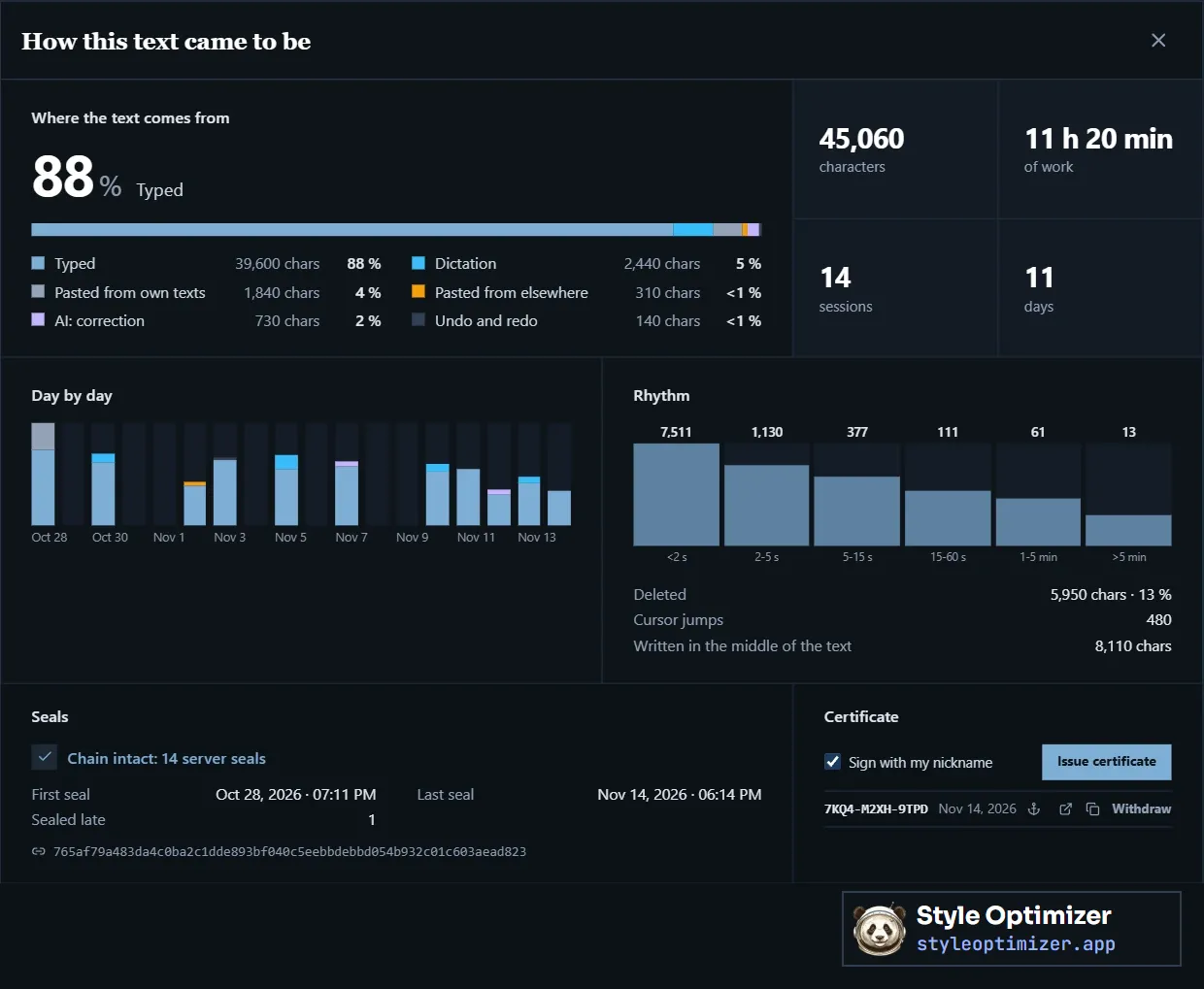
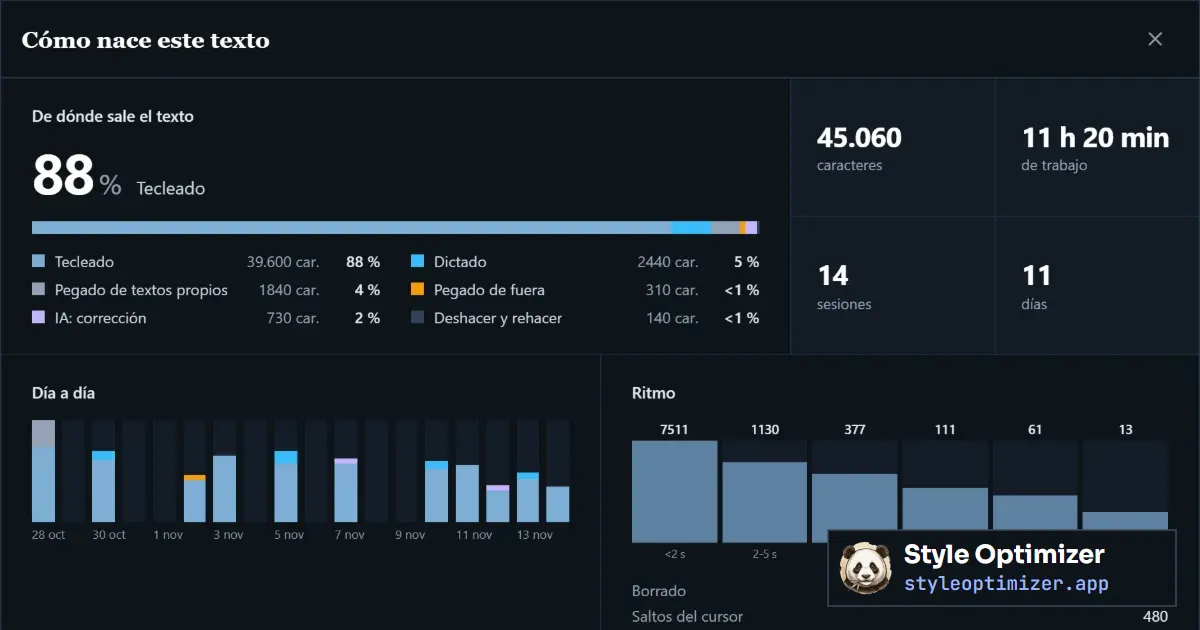
- Where the text comes from: the percentage of each origin, with its bar.
- Day by day: how much you wrote each day, and how.
- Rhythm: the pauses between changes, from under two seconds to over five minutes, the way they spread out when someone writes and thinks.
- Deletions, cursor jumps and text written in the middle: the traces of revision, of going back and rewriting.
- Seals: whether the chain is intact, the first and the last seal, and the stretches sealed late or written offline.
The panel shows data and leaves the conclusion to whoever reads it. No AI decides whether your text “is AI”: what gets certified is the process, with its figures in plain sight.
Sealed by the server, and chained
Your browser counts, and the server seals. On save, the database sets the time, takes the fingerprint of the text it has stored and signs the session with a cryptographic key kept in a vault on the server itself. Each seal also carries the fingerprint of the one before it, like the links of a chain: if someone removed or changed a session, the chain would break at that point, and the panel would say so. What you write offline is sealed when you reconnect, marked as “sealed late.”
On top of that, every night a fingerprint that sums up all the seals and certificates of the day is anchored in Bitcoin through the public OpenTimestamps calendars. That way anyone can check the date of a certificate at opentimestamps.org without relying on our clock. How each piece works, step by step, is in How We Certify Your Writing Process.
The certificate and its verification page
With PRO, the “Issue certificate” button turns a document’s record into a signed certificate. You can sign it with your nickname or leave it anonymous, copy its link and withdraw it whenever you like.
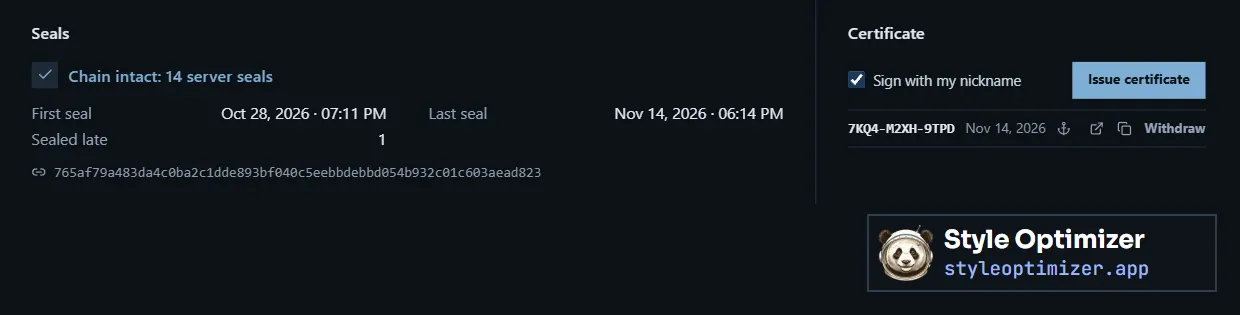
Every certificate has a public code, along the lines of 7KQ4-M2XH-9TPD, and a page at styleoptimizer.app/verificar/ that anyone can open without an account. It shows the title, the signature, the date of issue and the sealed figures: origins, rhythm, deletions, seals and the fingerprint of the text.
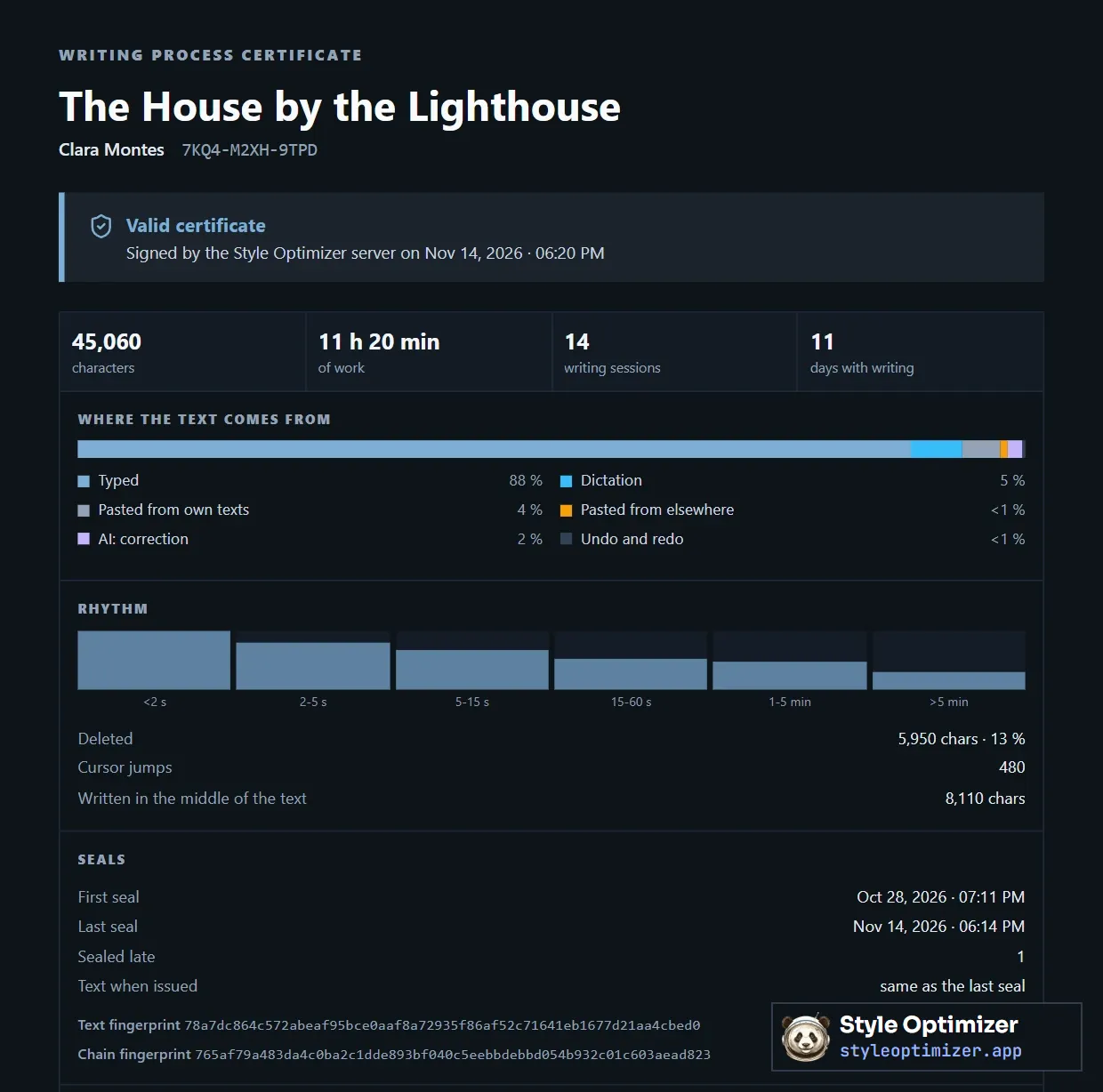
At the bottom, “Check a text” lets you paste the text you were handed: the browser computes its fingerprint and compares it with the certified one. If they match, that is the text whose process the certificate describes. The check runs in the verifier’s browser, and the certified text stays in its author’s account.
Under “External timestamp,” the same page says whether the certificate is already anchored in Bitcoin and in which block, and lets you download the sealed file and its .ots receipt to check the date at opentimestamps.org.
What you can do with it
- Submit a manuscript with its history. If you send a novel to a publisher or a story to a writing contest that asks for original work, add the certificate link to your cover letter or to your submission to a publisher. Whoever opens it sees weeks of work, session by session.
- Answer an accusation of AI use. Against a percentage from a detector, a sealed record with dates, pauses and corrections. It is a concrete answer that can be checked.
- Show your process to a teacher. Hand in the assignment with its link. The teacher pastes the text into the verification page and sees that it is the same one, and how it was written.
- Offer assurance in a newsroom. A reporter or a freelancer can send the certificate along with the piece, and the section editor can review it in a minute.
- For those who grade or select. Teachers, juries and editors get evidence to review in place of a suspicion to guess at.
What the certificate says, exactly
The certificate attests to the writing process in Style Optimizer’s editor: how the text came in, when, and that it is unchanged if its fingerprint matches. With the daily anchor in Bitcoin, anyone can also check that the certificate already existed on that date. Intellectual authorship and the legal registration of a work are established through their own channels, such as your country’s copyright office. It is worth reading the certificate with its scope in mind:
- What you copy out by hand, letter by letter, counts as typed. The certificate says so on its own page.
- Text that was already in the document before the record started appears separately, as “Already there before the record.”
- Changes made outside the editor show up as “Changed outside this editor,” with their figure.
- The AI you use inside the app is counted by name: correction or generation.
The longer you write in the editor, the more the record says: a certificate with many sessions, different days and a rhythm of pauses and deletions tells the story of real writing.
How to get started
- Write your text in the editor. The record works on its own from the first keystroke.
- Open Authorship to watch it take shape; the “Record settings” link takes you to Privacy.
- When you want to present it, issue the certificate with PRO and share its link.
If you write with help from AI and want your texts to stay in Europe, see also Private mode. The screenshots in this article show the app in Spanish.
Frequently asked questions
How can I prove I wrote a text myself?
With the process. If you write it in Style Optimizer’s editor, the record keeps where each character comes from, when and at what rhythm, sealed by the server. With PRO you turn it into a certificate with a public link that anyone can verify.
Does the certificate say whether a text was written by AI?
It tells how the text entered the editor: typed, dictated, pasted or proposed by the app’s AI, with the figures for each. The conclusion is drawn by whoever reads it, with the data in front of them.
Is my text, or what I type, stored?
The record stores figures: characters by origin, deletions, minutes, pauses by range and cursor jumps. The public page shows those figures and the fingerprint of the text, which is used to check whether a text is the same one.
How much does it cost?
Recording is free for every account, and so is the Authorship panel. Issuing certificates is a PRO feature.
Can I turn the record off?
Yes, under Account → Privacy, and you can turn it back on whenever you like. Whatever is written with the record off stays out of the figures.
How do I check the date without trusting Style Optimizer?
With the daily anchor. Download the sealed file and its .ots receipt from the certificate page and drag them onto opentimestamps.org: it will tell you which Bitcoin block it is recorded in, and since when. The steps are in How We Certify Your Writing Process.
Does it work as copyright registration?
They are different things: a public registry records who holds the rights to a work, and the certificate documents how it was written in the editor and that it existed on a given date. For a finished book, look into registration with your country’s copyright office; the certificate can go along with it.
What happens if I withdraw a certificate?
Its verification page then says that its author withdrew it, with the date. You can issue another one whenever you like.