Fantasy Map Makers: Inkarnate, Wonderdraft and More Compared
November 21, 2026 · Equipo Style Optimizer
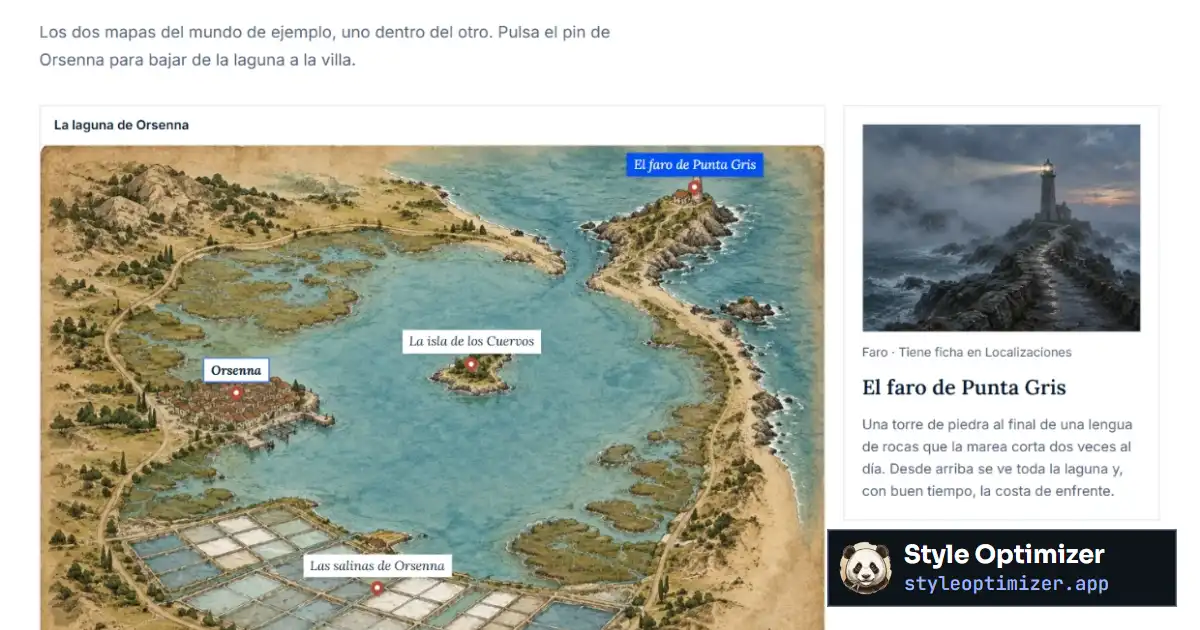
Most fantasy maps today are drawn with one of three programs: Inkarnate, which runs in the browser and has a free plan; Wonderdraft, a desktop app you buy once; and Dungeondraft, from the same studio, built for dungeons and battle maps. If you want a whole world generated at random, Azgaar’s Fantasy Map Generator is free and open source. Style Optimizer handles the next step: you upload the finished map and pin your novel’s places onto it, each with its own profile.
Here we compare all four fantasy map makers using data from their official websites and walk through how to make a fantasy map step by step. We make Style Optimizer, so we say clearly where the others do better.
Fantasy map makers compared
| Inkarnate | Wonderdraft | Dungeondraft | Style Optimizer | |
|---|---|---|---|---|
| Price | Free (Hobby). Creator: $7.99/month or $39.99/year. Studio: $14.99/month or $79.99/year. Taxes extra. | One-time payment of $29.99, no subscription. | One-time payment of $19.99, no subscription. | Free. PRO: €4.90/month, €9.90/quarter or €34.90/year (VAT included). |
| Free plan | Yes: 3 maps, 2K export, personal use and a selection of 787 assets. | No. | No. | Yes, no card needed: 3 maps, 20 places, 5 characters and 1 globe. |
| Platform | Browser, online only. Paid plans include a desktop app. | Best pickDesktop: 64-bit Windows and Linux. Works offline. | Best pickDesktop: 64-bit Windows and Linux. Works offline. | Browser, nothing to install. Needs a connection. |
| World and regional maps | Best pickYes: world, regional, city, parchment and watercolor styles, with more than 25,000 assets on paid plans. | Best pickYes: automatic coastlines, rivers and roads, mountain and tree brushes, themes and label styles. | Built for interiors: dungeons, caves and buildings. | Upload a finished map or start from a template. |
| Dungeons and battle maps | Yes, with dedicated packs (sci-fi too). | — | Best pickYes: dungeon and cave generator, lighting, and export to virtual tabletops such as Foundry VTT and Roll20. | — |
| Map size | Exports at 2K (free), 8K (Creator) or 16K (Studio). | From 512 to 8,192 pixels per side. | Not stated on its website. | Whatever size your uploaded image is. |
| Commercial use | Studio plan only. | Best pickIncluded, no extra license. | Best pickIncluded, no extra license. | The map is yours: you upload it. |
| Places with profiles and nested maps | — | — | — | Best pickPins with a pop-up card (photo and description) and pins that open another map, as many levels deep as you need. |
| 3D globe | — | — | — | Best pickAn Earth globe with real coordinates, plus a custom globe that wraps your map around a planet. |
| Strengths | Professional-looking results in minutes, right in the browser. | Beautifully finished world maps, with no subscription and no connection needed. | Dungeons ready to play on a virtual tabletop. | The map connected to your profiles, outline and manuscript. |
| Weaknesses | The free plan exports at low resolution, for personal use only. | No Mac version according to its website, and no free plan. | Of little use for a continent map. | You need another program to draw the map. |
Data checked on the official websites in November 2026. Prices may change. Blue marks the best pick in each row; descriptive rows and ties are left unmarked.
Inkarnate: fantasy maps in your browser
Inkarnate is the best known and the easiest to start with. You work in the browser with stamps (mountains, forests, cities), textures and brushes, and choose among world, regional, watercolor city, parchment and battle map styles. Its FAQ says you need an internet connection and that the maps you create belong to you.
According to its pricing page, the Hobby plan is free, with 3 maps, editing and export at 2K and a personal-use license. Creator costs $7.99 a month or $39.99 a year: more than 25,000 assets, up to 100 maps, 4K editing, 8K export, your own assets and a desktop app. Studio, at $14.99 a month or $79.99 a year, adds commercial use, unlimited maps and 16K export. Prices are in US dollars and taxes are extra.
If you plan to print the map on your novel’s endpapers, check two things: resolution (2K falls short for a good-sized print) and the license, because commercial use starts at Studio.
Wonderdraft: a world map with no subscription
Wonderdraft is a desktop program from the studio Megasploot for world and regional maps. You paint the land and the program shapes the coastlines for you; you draw rivers and roads, paint clusters of mountains and trees, and choose themes and label styles. It supports drawing tablets and maps from 512 to 8,192 pixels per side.
You buy it once for $29.99, with no subscription, no DRM and no extra commercial license: you can use the map in a book you sell. Its website lists 64-bit Windows 10 or Ubuntu as requirements, and the platforms it shows are Windows and Linux. It works offline.
Dungeondraft: dungeons and battle maps
Dungeondraft, from the same studio, is for interiors: dungeons, caves, taverns, fortresses. It comes with a dungeon and cave generator, a lighting system and export to virtual tabletops such as Foundry VTT, Roll20 and MapTool. It costs $19.99 as a one-time payment, with no subscription or extra commercial license, and runs on 64-bit Windows and Linux.
For a novelist it has one specific use: the floor plan of the castle where half the book takes place, so you know how many doors stand between the kitchen and the tower. For a continent, Wonderdraft or Inkarnate is a better fit.
Azgaar’s Fantasy Map Generator: a free generated world
Azgaar’s Fantasy Map Generator is a free, open-source web app under the MIT license that generates fantasy maps procedurally: click “new map” and a whole world appears, which you then edit layer by layer. Besides the browser version, it offers desktop installers for Windows, macOS and Linux. It’s a good way to start from a geographically sensible world when the blank page freezes you, though its menus take time to master.
Style Optimizer maps: your novel’s places, pinned to the map
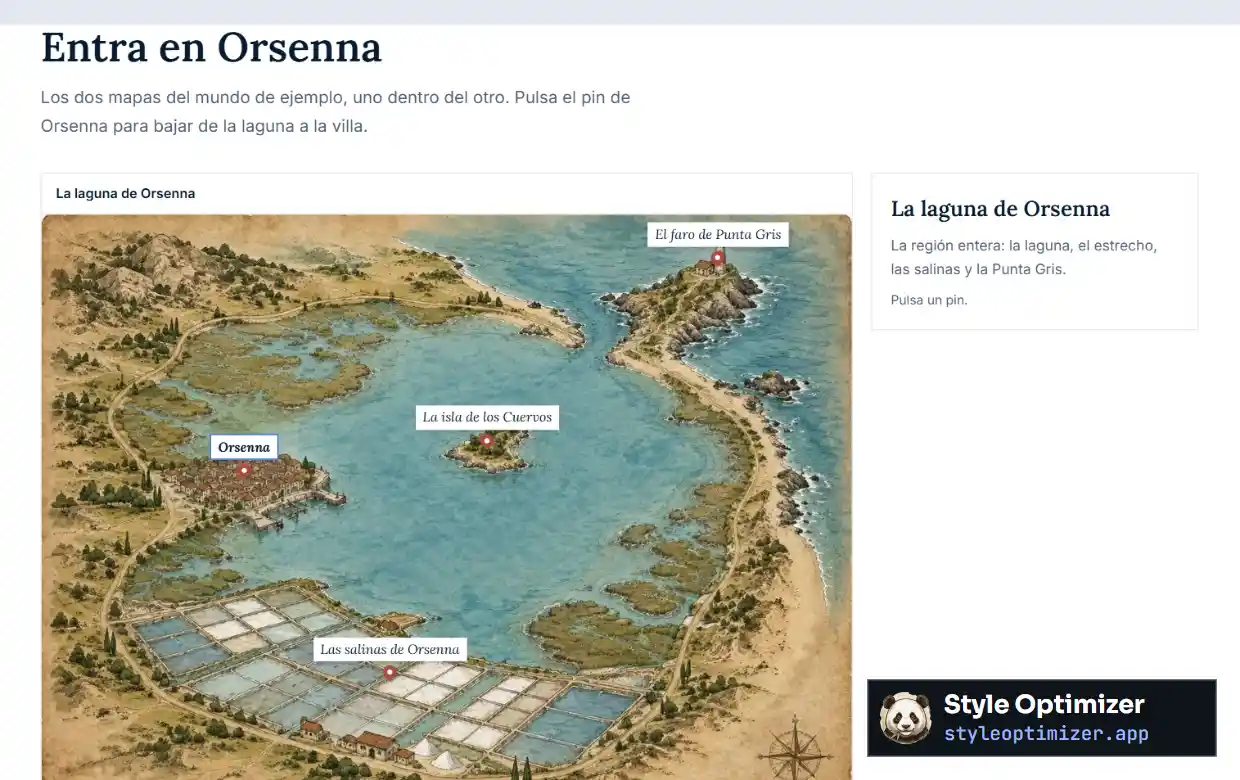
The programs above produce an image. Style Optimizer’s maps turn that image into an index of your novel: you upload the map, real or fantasy, and pin the story’s places onto it. If you don’t have a map yet, you can start from one of its high-resolution fantasy templates, a blank parchment or a grid canvas.
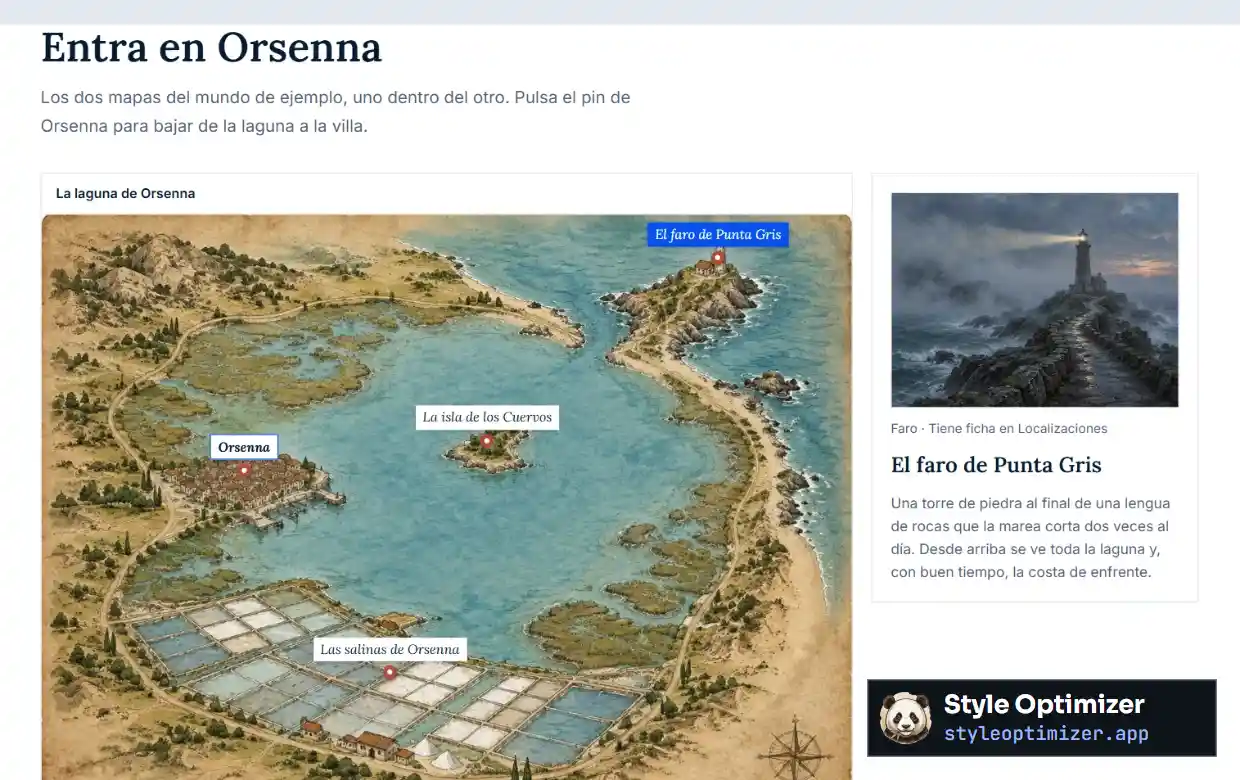
Each pin opens a pop-up card with a photo and description, linked to the place’s full profile in Locations, which lists the chapters where it appears. And a pin can open another map: in Orsenna, the town pin takes you from the lagoon down to the street plan.
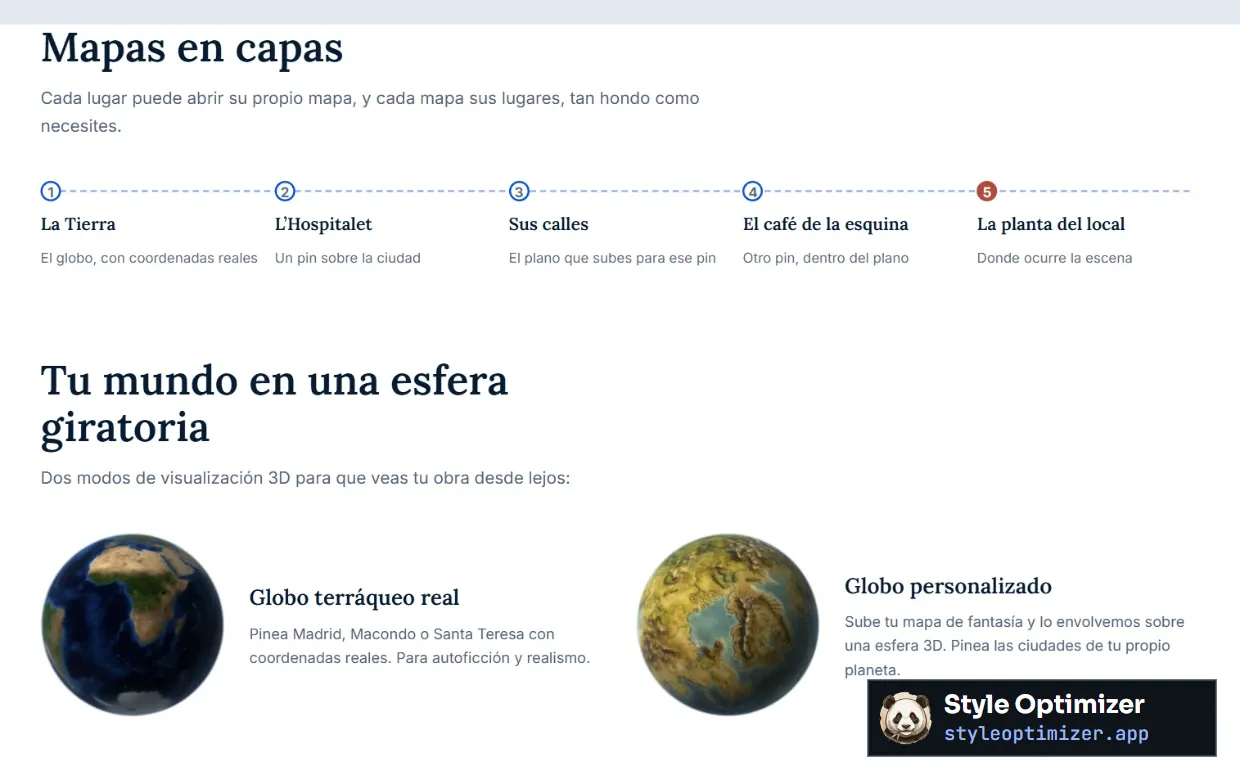
The layers go as deep as you need: the planet, the city, the street, the café, the floor plan. For the top level there are two 3D globes: the Earth globe, with real coordinates, and the custom globe, which wraps your fantasy map around a sphere so you can pin the cities of your own planet. If you’re going to draw a whole planet, read how to create a fictional planet first.
The usual workflow is to draw in Inkarnate or Wonderdraft, export the image and upload it to Style Optimizer to work on the novel over it.
How to make a fantasy map, step by step
- Let the story set the scale. An epic journey calls for a continent; a palace intrigue, a city. Draw only the territory the novel covers, plus a little margin.
- Draw the coastline first. Ragged coasts with capes, bays and islands look more believable than rounded shapes.
- Place the mountains. Ranges form long chains that follow plate boundaries. On the far side of a tall range that blocks the clouds, you’ll usually find dry land.
- Run the rivers downhill. They rise in the highlands, flow toward the sea or a lake and merge as they go. They almost never split, except in deltas.
- Spread out climates and landscapes. Ice near the poles, forests where it rains, deserts in the rain shadow of mountains.
- Found cities where there’s water and passage: river mouths, river crossings, natural harbors, mountain passes. Connect the cities with roads.
- Draw borders along rivers and mountain ranges, and leave one in dispute: it’s a source of conflict.
- Name things consistently. Give each people its own sounds.
- Check the distances. On foot, people cover roughly 15 to 20 miles (25–30 km) a day. Add a scale bar and test the journeys in your plot.
- Pin your novel’s places in Style Optimizer’s maps, each with its profile, so you can check them while you write.
What goes on the map depends on the world you built first: who rules, what’s scarce, where the border lies. We explain it in how to create a fantasy world. And if you need software for the rest of your world (timelines, cultures, species), see our comparison of World Anvil alternatives.
Who each one is for
- Inkarnate, if you want to start free in the browser and get an eye-catching map fast. To publish the map in a book, go for the Studio plan.
- Wonderdraft, if you work on Windows or Linux, prefer to pay once and want a world map with commercial use included.
- Dungeondraft, if you need building floor plans, dungeons or roleplaying maps.
- Azgaar’s Fantasy Map Generator, if you want a complete, randomly generated world for free that you can edit later.
- Style Optimizer, if you already have a map and want to connect it to your novel’s places, characters and scenes.
Fantasy map maker FAQ
What’s the best free fantasy map maker?
Inkarnate has a free plan with 3 maps and 2K export for personal use, which is enough to plan your novel. Azgaar’s Fantasy Map Generator is free and open source and generates a complete world you can edit. To print the map in a book at a good resolution, you’ll need Inkarnate’s Studio plan or Wonderdraft.
How much does Inkarnate cost?
According to its pricing page, the Hobby plan is free. Creator costs $7.99 a month or $39.99 a year, with 8K export and a desktop app. Studio costs $14.99 a month or $79.99 a year and adds commercial use and 16K export. Prices are in US dollars and taxes are extra.
Does Wonderdraft work on Mac?
Its official website lists 64-bit Windows 10 or Ubuntu as the minimum requirement, and the platforms it shows are 64-bit Windows and Linux. If you work on a Mac, the most direct alternatives are Inkarnate, which runs in the browser, and Azgaar’s Fantasy Map Generator, which has a web version and a macOS installer.
Can I use an Inkarnate map in my published novel?
According to Inkarnate’s FAQ, commercial use, which includes selling maps or using them in a work for sale, comes with the Studio plan, and maps exported while Studio was active keep that license even if you cancel. The Hobby and Creator plans are for personal use. Wonderdraft includes commercial use in its one-time price.
Can I upload a map made in Inkarnate or Wonderdraft to Style Optimizer?
Yes. Export the map as an image and upload it to Maps. Then pin your novel’s places, each with its pop-up card, and make any pin open a more detailed map. If the map shows an entire planet, the custom globe wraps it around a 3D sphere.