Free Novel Writing Software: Manuskript, bibisco and yWriter
November 21, 2026 · Equipo Style Optimizer
The best free novel writing software for your computer comes down to three classic names: Manuskript, bibisco and yWriter. Manuskript is open source and stands out for planning with the Snowflake Method. bibisco is known for its character interviews and its clean order of chapters and scenes, with a free edition and a one-time-payment edition. yWriter, also free, rounds out the trio.
Here we compare all three using data from their official websites and set them beside Style Optimizer, which runs in the browser. We make Style Optimizer, so we also point out where the others do better.
Manuskript vs. bibisco vs. yWriter vs. Style Optimizer at a glance
| Manuskript | bibisco | yWriter | Style Optimizer | |
|---|---|---|---|---|
| Price | Free. | Community Edition free. Supporters Edition as a one-time payment (list price €69 or $69). Sync with bibisco Everywhere: €3.49/month or €29.99/year. | Free; the author encourages you to register your copy if you find it useful. | Free. PRO: €4.90/month, €9.90/quarter or €34.90/year (VAT included). |
| License | Best pickOpen source (GNU GPL, version 3 or later). | A free edition and a paid edition. | Free to download and use. | Web service with a free plan. |
| Platform | Packages for Windows and Linux; on other systems, from the source code (Python). | Best pickWindows, macOS and Linux, plus a mobile app for Android and iOS. | Windows 7 or later, a macOS version and apps for Android and iOS (they edit your projects through Dropbox). | Browser, on any system. Needs a connection. |
| Interface language | English, translated by the community into dozens of languages. | 16 languages, English included. | Its website is in English. | Spanish; only some sections are in English. |
| Planning | Best pickA guided Snowflake Method, a hierarchical outline, plots linked to characters and a section for the world. | Premise, fabula, setting, narrative strands, and chapters and scenes. Timeline and mind maps in the paid edition. | Chapters and scenes you drag from one to another, with characters and locations. | An outline board with lanes by plotline or character and two timelines (book and story), plus plot prompts to help you find the story. |
| Characters | Profiles with the useful information on each one. | Best pickCharacter interviews with guided questions; your own questions in the paid edition. | Character profiles. | Profiles, plus AstroLab, which builds characters from a birth chart or an I Ching hexagram. |
| Places and maps | Notes on the world. | Location profiles; objects in the paid edition. | Location profiles. | Best pickPlace profiles, maps with nested pins and a 3D globe. |
| Export | Best pickHTML, ePub, OpenDocument and DocX, among others (some require Pandoc). | PDF, DOCX and TXT. EPUB, manuscript format and a print book for KDP in the paid edition. | Exports chapters to RTF. | Best pickPDF, EPUB and DOCX. |
| AI | Its website advertises no AI features. | No text generation, according to its FAQ. | Its author says it doesn’t write or come up with ideas for you. | Yes: El Juez, Cerebro and style analysis. |
| Strengths | Open source, completely free and with guided planning. | The clearest organization and versions for every system. | Simple, with automatic backups of every scene. | Maps, characters and outline next to the text, with nothing to install. |
| Weaknesses | Its website warns that it’s still in development and recommends frequent backups. | The most advanced features are paid. | On Linux, only through Wine. | No offline mode and no desktop app. |
Data checked on the official websites in November 2026. Prices may change. Blue marks the best pick in each row; descriptive rows and ties are left unmarked.
Manuskript: open-source software for planning and writing
Manuskript is an open-source program written in Python and licensed under the GNU GPL. Its own website presents it as a tool for writers who like to organize and plan everything before they write, and sums it up in four pieces:
- A hierarchical outline: you arrange ideas and fragments in levels and reorder them as you go.
- A novel assistant built on the Snowflake Method: you start from a one-sentence idea and the program guides you step by step, with questions, until you have characters, plots and a detailed universe.
- Characters, plots and world: character profiles, plots linked to them and a section for the world they live in.
- A distraction-free mode, with a word or time goal to hit before you leave the editor.
It imports and exports HTML, ePub, OpenDocument and DocX, among others; some formats require installing Pandoc. The latest release is 0.17.0, from June 2025, and its download page offers packages for Windows and for Linux distributions such as Debian, Ubuntu and Fedora, along with the source code. The community has translated the interface into many languages.
One warning the website puts front and center: the program is still in development, and it recommends frequent backups. If you choose it, keep your project in a synced folder or make copies by hand every week.
bibisco: an orderly novel, with character interviews
bibisco is a desktop program for Windows, macOS and Linux, first released in April 2014 and developed independently. Its website mentions more than 200,000 writers who have downloaded it and 16 interface languages.
The Community Edition is free and includes unlimited projects, premise, fabula, setting, narrative strands, character interviews, locations, chapters and scenes, import of DOCX and ODT drafts, export to PDF, DOCX and TXT, and automatic backups. The interviews are its most recognizable feature: you answer each question in the character’s voice.
The Supporters Edition is a one-time purchase with no subscription; the website lists it at €69 (or $69), with discounts depending on the country. It adds a timeline, mind maps, analysis, objects, your own questions for characters and locations, a distraction-free mode, find and replace, writing goals, revision comparison, and export to EPUB and to a print book for KDP. The free download includes a 30-day trial of this edition.
Projects are stored on your computer and work offline. With the bibisco Everywhere subscription (€3.49 a month or €29.99 a year), they sync with the mobile app for Android and iOS. According to its FAQ, bibisco doesn’t generate text: the writing is yours.
yWriter: scenes, backups and nothing else
yWriter was created by Simon Haynes, a programmer and novelist, to write his own books. It’s free and splits the novel into chapters and scenes that you drag from place to place, with character and location profiles. It saves automatic snapshots of every scene, so you can go back to the version from half an hour ago or from months ago. yWriter7 is designed for Windows 7 or later and, according to its website, runs on Linux through Wine; there’s also a macOS version and apps for Android and iOS that edit your computer’s projects through Dropbox.
Style Optimizer: the browser-based alternative
If you’d rather not install anything, or you write from several computers, Style Optimizer’s Fiction section covers the same modules as these programs, right in the browser.
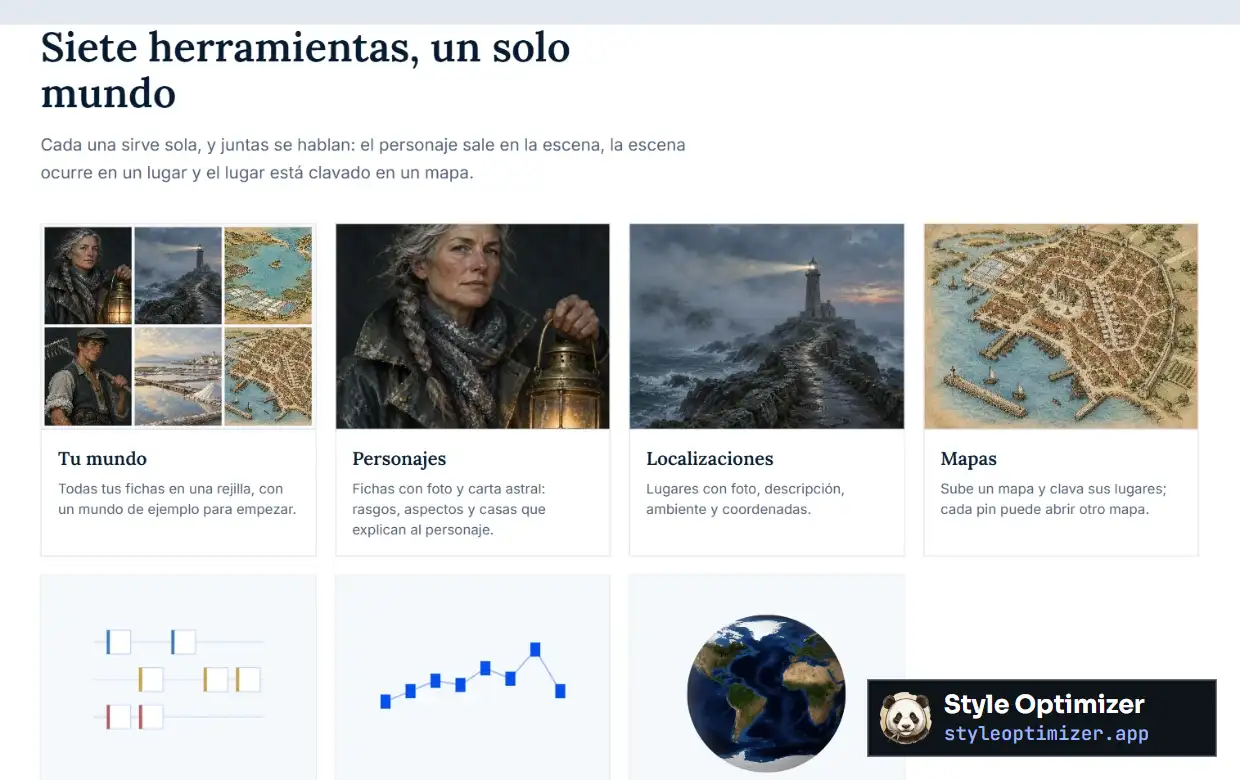
The pieces match up almost one to one: character profiles and AstroLab take the place of profiles and interviews; Locations stands in for places; and the text is written in a chapter-based editor that exports to PDF, EPUB and DOCX.
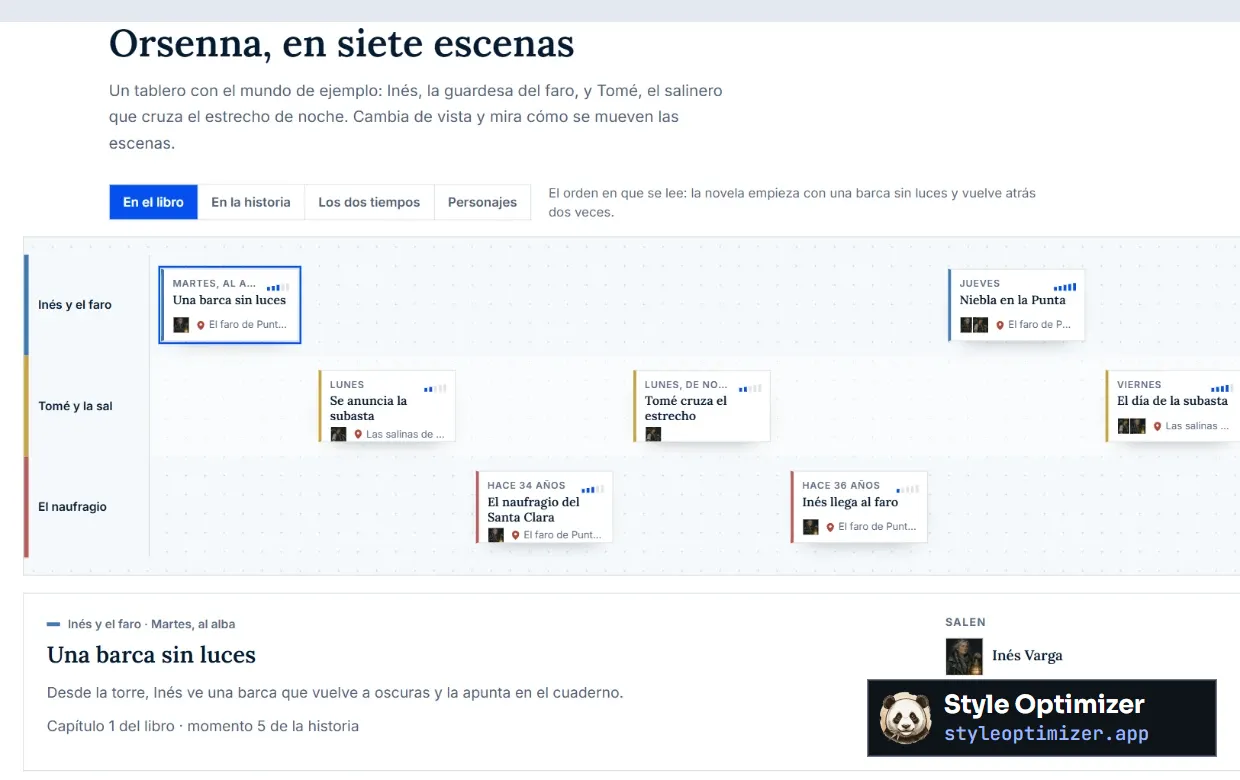
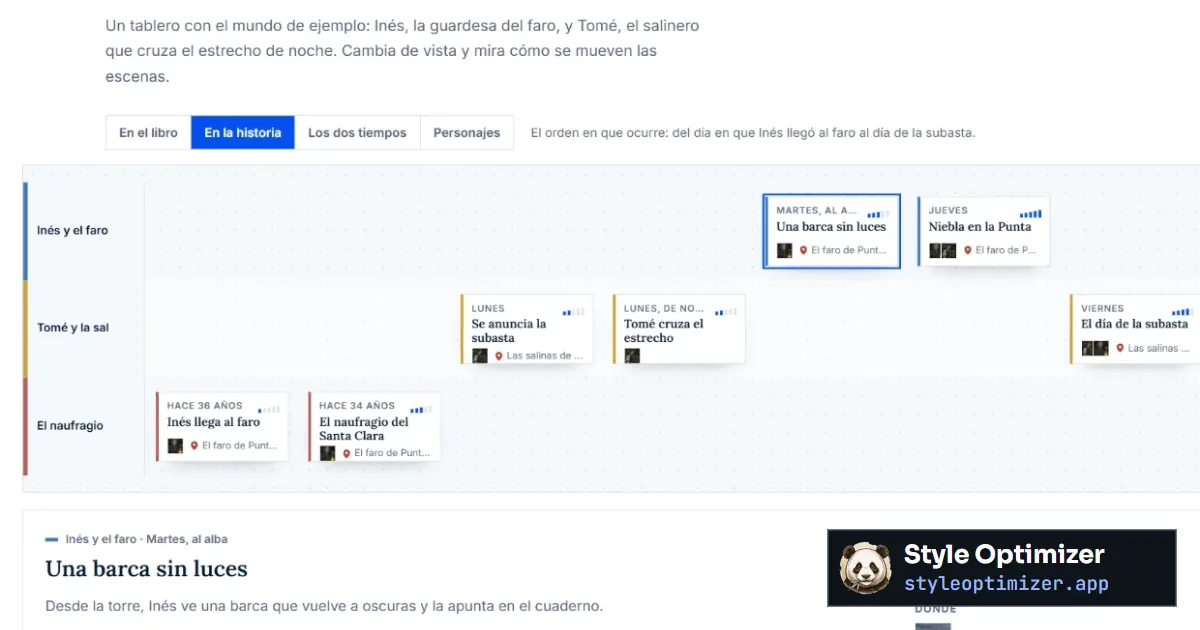
For planning, the outline board does the job: each scene is a card, each plotline a lane, and you can see both the order in which the book is read and the order in which the story happens. It’s the closest thing to bibisco’s narrative strands and Manuskript’s outline. If you’ve never made one, start with what a scene outline is and how to make one.
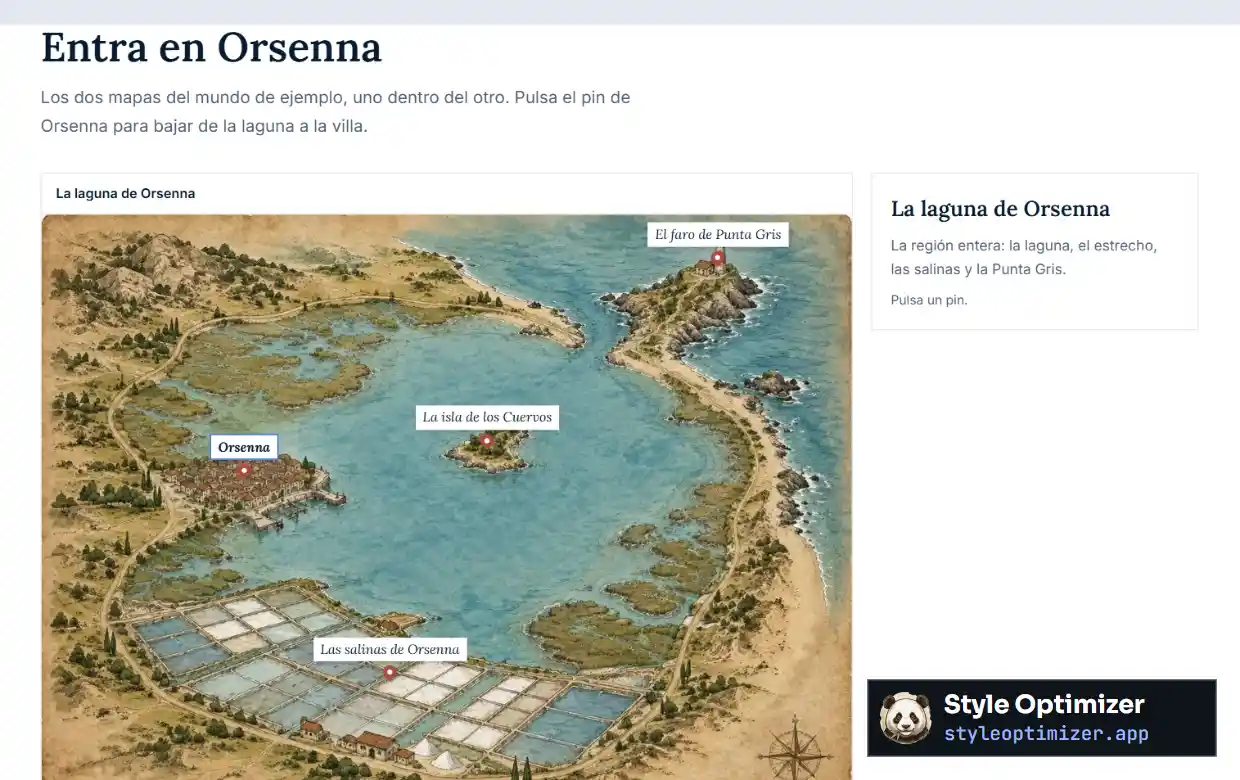
Where Style Optimizer goes further is space: maps with pins that open each place’s profile or a smaller map, and a 3D globe for entire worlds. The free plan includes 5 characters, 20 places, 3 maps and 1 globe; PRO costs €4.90 a month, €9.90 a quarter or €34.90 a year, VAT included. What it doesn’t offer is offline work: if you often write without internet, Manuskript, bibisco or yWriter will suit you better.
Which one to choose
- Manuskript, if you want open-source software, like to plan before you write and find the Snowflake Method helpful for getting from idea to structure. Back up often.
- bibisco, if you want the most orderly and polished program, on macOS or any other system, and getting to know your characters by interviewing them works for you. The free edition is enough for a first novel.
- yWriter, if you want something simple, built around scenes and with automatic backups.
- Style Optimizer, if you prefer the browser, want maps and characters connected to your outline and are interested in AI review of your text.
If you’re willing to pay for planning, compare Plottr and Dabble in Plottr alternatives. And for the whole process beyond the software, read how to write a novel.
Frequently asked questions about free novel writing software
Is Manuskript really free?
Yes. Manuskript is open-source software under the GNU GPL, with no paid edition. Its interface has been translated by the community into many languages, and the menus, profiles and Snowflake assistant can be switched to your language in the settings. Its website warns that it’s still in development, so back up your project often.
Is bibisco free?
The Community Edition is free for Windows, macOS and Linux, with unlimited projects, character interviews, locations, chapters and scenes, and export to PDF, DOCX and TXT. The one-time-payment Supporters Edition adds a timeline, objects, a distraction-free mode and EPUB export, among other features. The download includes a 30-day trial of that edition.
What’s the difference between Manuskript and bibisco?
Manuskript is open source and entirely free, with an assistant that applies the Snowflake Method and a very flexible hierarchical outline, though its website warns that it’s still in development. bibisco is more polished and orderly, has a macOS version and character interviews, and keeps its advanced features for a one-time-payment edition.
Is there free novel writing software for Mac?
bibisco publishes its free edition for macOS, as well as Windows and Linux. yWriter has a macOS version. Manuskript offers packages for Windows and Linux, and on other systems it runs from the source code. If you’d rather not install anything, Style Optimizer works in any Mac browser, with a free plan.
Can I use Manuskript or bibisco together with Style Optimizer?
Yes. You can write the manuscript in Manuskript or bibisco, export it to DOCX and upload the chapters to Style Optimizer to review them with style analysis and El Juez. The maps with pins, AstroLab characters and the outline board work on their own, as support while you write in the program you prefer.